Hours of hand maths every week.
Spreadsheets, calculators, and re-checking.
 CrewTill by KindPenny
Get early access
For Canadian bars and restaurants
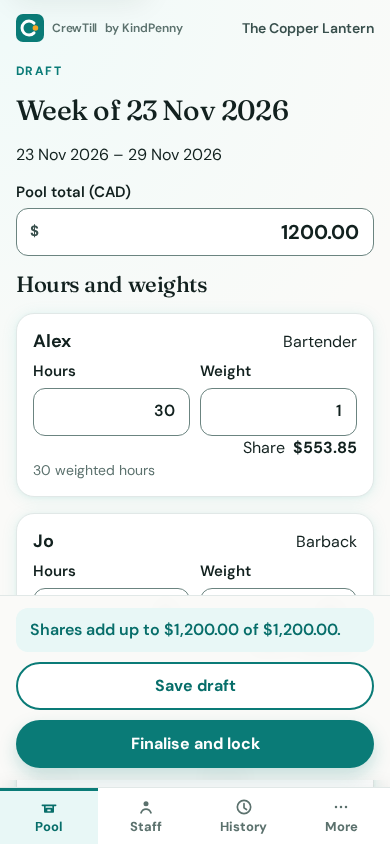
Enter the pool for one week or two, plus hours and role weights. Weekly is the default. CrewTill splits it to the exact cent and gives every staff member a private link showing how their share was worked out.
Free for one venue. No credit card. Built for Canada, in CAD.
In a lot of venues, the split still gets done by hand on a laptop behind the bar. It eats a manager's evening every week, one wrong cell can short-change someone, and when it does, nobody can show where the numbers came from.
For staff, it's often just a number on a paycheque. They don't see the hours, the weights, or the maths, so even a correct split can feel like guesswork. When a mistake does happen, it can take days to untangle, and the trust takes longer to come back.
Spreadsheets, calculators, and re-checking.
A few cents off here and there, every pay period.
No way for anyone to check their own share.
Add your staff and their roles, and give each role a weight (for example, bartender 1.0, server 1.0, barback 0.5). CrewTill remembers them for next week.
Type in the pool total in CAD and each person's hours. A period is one week by default, Monday to Sunday, or two weeks from that Monday. You'll see every share update live before you commit.
CrewTill locks the period and creates a private, read-only link for each staff member. Send it however you already talk to your team: text, group chat, or the staff board.
Shares are rounded to whole cents in a way that always adds up to exactly the pool. No stray pennies, no "close enough."
Each staff link shows that person's hours, role weight, weighted hours, and share, plus the pool total, the total weighted hours, and the per-weighted-hour rate. Their share is their weighted hours times that rate, rounded to the cent by largest remainder. They never see a coworker's name, hours, weight, or share, and they don't need an account or an app.
The split uses whole cents and always totals the exact pool amount, so the numbers on the page match what you pay out.
Once a week is finalised, it can't be changed behind anyone's back. A fix creates a new version, the old one is kept, and that person's link shows that it was corrected, when, and what changed on their own line.
Every change is recorded: who did it, when, and the old and new values. Entries are append-only in ordinary use. A deletion request replaces a name with "Former staff" and does not change the amounts.
Links are long, random, and practically impossible to guess. Revoke one at any time, for example when someone leaves.
Dollars in CAD, Canadian formatting, and wording that doesn't assume US rules.
Free to start.
$0
Checkout isn't open yet. Start free, or join early access.
We're opening CrewTill to a small group of Canadian venues first. Leave your details and we'll send you an invite, then ask for a bit of honest feedback.
Work at a venue that pools tips? Send this page to your manager.
Yes. One venue, up to 100 staff, one pool per period, and pools that ended in the last 8 weeks are free. A period is one week by default, or two weeks from a Monday to the Sunday 13 days later. Pro adds unlimited history, CSV export, and multiple managers. It is not on sale yet. No GST/HST collected. You can start free, or join early access.
No. Each person gets a private link that opens in any phone browser. They can see their own breakdown, but they can't change anything.
No. A link shows that person's own hours, weight, weighted hours, and share, plus the pool total, the total weighted hours, and the rate, so they can check the maths. It never shows a coworker's name, hours, weight, or share.
Each person's hours are multiplied by their role weight. The rate is the pool divided by the total weighted hours. Their share is their weighted hours times that rate, rounded to the cent by largest remainder so the shares add up to exactly the pool. If two people are equally close to the next cent, the extra cent goes to the same person every time for that pool.
Before you finalise, you can change anything. After you finalise, you make a correction: CrewTill creates a new version, keeps the original, and that person's link shows what changed on their own line, and when.
No. CrewTill works out the split and shows it. You pay staff the same way you do today.
Not yet. For now you enter the pool total and hours yourself, which takes a few minutes a week. Integrations are something we're looking at, so tell us what you use when you sign up.
Not in the first version. CrewTill splits one week or two weeks by hours and role weight. Weekly is the default. If you need something else, mention it in the signup form.
No. CrewTill is a calculator. Tip-pooling rules vary by province, so check your provincial employment standards or talk to an adviser about what's allowed in your venue.
CrewTill is made by KindPenny, a small app studio.